SureCart + MailerPress

Turn buyers into subscribers, automatically.

When someone buys in SureCart, this connector adds them to the right MailerPress list — automatically. Optional per-product lists and tags, order data synced to custom fields for segmentation, and a one-click backfill of every existing customer. Set it up once, and your audience keeps itself up to date.
Settings → SureCart → MailerPress
Works with SureCart · MailerPress · MailerPress Pro · WordPress · Action Scheduler · WP Multisite
SureCartMailerPressMailerPress ProWordPressAction SchedulerWP MultisiteSureCartMailerPressMailerPress ProWordPressAction SchedulerWP Multisite
01 — Who it's for

Built for anyone selling with SureCart

Whether you sell plugins, courses, or memberships, your buyers belong on a list you can actually email — segmented by what they bought.
Plugin & theme shops

Email buyers of each product

Put everyone who bought a given product on its own list, so release notes and upsells reach exactly the right people.

Course creators

Onboard students automatically

New purchase, new subscriber — drop course buyers straight into your welcome sequence without exporting a thing.

Memberships

Keep your list in sync with access

Tag members when they join, and build a win-back segment when a subscription lapses.

Digital products

Know who bought what

Order value, last product, and customer-since land on every contact, so you can segment by spend and recency.

02 — Sync

Every buyer lands on the right list

When a SureCart checkout completes, the connector adds the customer to MailerPress automatically — no exports, no Zapier, no missed customers.
Core capability

One customers list, plus per-product lists and tags

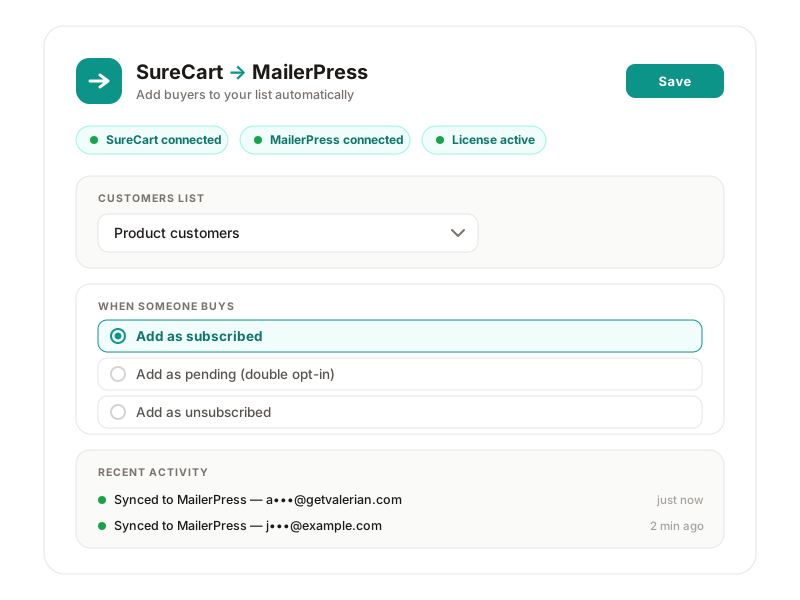
Add every buyer to a master customers list, and optionally to extra lists or tags based on the exact products they purchased. You can even create new lists right from the settings screen.
Trigger

On every confirmed checkout

Listens to SureCart's checkout event and upserts the buyer the moment a sale completes.

Lists

Global + per-product

A master list for all customers, plus optional lists and tags per product — everyone who bought X, in one segment.

Setup

Create lists in place

Name a list and start using it without ever leaving the settings page.

03 — Segment

Segment by what they actually bought

The connector syncs order data into MailerPress custom fields, so your segments can be as specific as your campaigns need.
Core capability

Order data on every contact, ready to segment

Last product, last order value, last order date, and customer-since are written to MailerPress custom fields automatically — the fields are even created for you.

Fields

Last product & order value

Target recent buyers, bigger spenders, or owners of a specific product.

Tags

Per-product tags

Tag buyers by product for fast, reusable segments.

Automatic

No manual field setup

Custom fields are created in MailerPress the first time they're needed.

04 — Consent

Consent handled the way you want

A purchase isn't automatically marketing consent — so you decide how buyers are added, and the connector respects choices they've already made.
Core capability

Subscribed, double opt-in, or for-the-record

Choose whether buyers are added as subscribed, pending (double opt-in), or unsubscribed. Anyone who opted out in SureCart is added unsubscribed, and existing MailerPress unsubscribes are always respected.

Configurable

Three consent modes

Subscribed, double opt-in, or on-the-list-but-never-emailed.

Respectful

Honors opt-outs

SureCart opt-outs and MailerPress unsubscribes are never overridden.

Idempotent

No duplicates

Re-running is always safe — contacts are updated, never duplicated.

05 — Lifecycle

React to the whole subscription lifecycle

Subscriptions aren't one-and-done. The connector can respond when a customer gains or loses access.
Core capability

Tag active subscribers, build win-back segments

Add customers to optional lists or tags when they gain access (new or reactivated) and when they lose it (cancelled, expired, or refunded) — or leave it off entirely. Refunds do nothing unless you say so.

Granted

On new or reactivated access

Drop active subscribers into an “active members” list or tag.

Removed

On cancel, expire, or refund

Build a win-back segment from lapsed customers.

Off by default

You stay in control

Lifecycle actions only run when you configure them.

Works with

The tools you already use — nothing new to learn

It's a focused bridge between two tools you already run — SureCart for selling, MailerPress for email. Nothing else to wire up, and no third-party automation service sitting in the middle.

06 — How it works

From checkout to subscriber, in the background

Every purchase follows the same quiet, reliable path — no clicks, no exports, no waiting.

A customer checks out

Someone completes a purchase in your SureCart store.

The connector reads the order

It pulls the buyer's email, name, and the exact products they bought.

Lists, tags & fields are set

The buyer is upserted into MailerPress on your customers list, plus any per-product lists, tags, and custom fields.

It runs in the background

Work is queued via Action Scheduler, so checkout is never slowed down.

Your list stays current

Repeat purchases, new products, and lifecycle changes keep every contact up to date — automatically.

07 — Compare

Stop exporting customer lists by hand

CSV exports and manual imports break down the moment you have more than a handful of sales — and they always miss someone.
Manual exports & automation glue
  • Exporting CSVs, importing them by hand, or wiring up a paid automation tool — slow, easy to forget, and your segments are only ever as fresh as your last export.
The SureCart → MailerPress Connector
  • Automatic on every sale, per-product lists and tags, order data synced to custom fields, a one-click backfill of existing customers, and consent handled the way you choose.
08 — Why

Why store owners choose it

It does one job, does it well, and gets out of the way — so your customer list is always something you can actually use.
Core capability

A customer list that keeps itself up to date.

Instead of remembering to export and import after every sale, your buyers flow into MailerPress automatically — segmented, consented, and ready to email.

Set & forget

Configure once

Pick your lists and consent rules once; every future sale follows them.

Segmentation

Real segments, not guesses

Per-product lists, tags, and order-value fields make targeted campaigns easy.

Safe

Idempotent & respectful

No duplicates, honors unsubscribes, and your data never leaves your site.

09 — Trust

Built to be safe and boring

It uses MailerPress's own contact engine and SureCart's own events — no shortcuts, no surprises.
Your data

Stays on your site

Customer data goes from SureCart to your own MailerPress install — never to us or any third party.

Idempotent

Safe to re-run

Built on MailerPress's contact upsert, so contacts are updated, never duplicated.

Background

Never slows checkout

Sync work is queued via Action Scheduler, so buyers never wait on it.

Plans

Honest pricing for a tool that does one job well

One plugin, two tiers. Pay yearly or buy a lifetime licence — whichever suits you. Use it on a single store or unlimited stores.
Single site - one-time (LTD)
$79one-time
Buy now
Unlimited - one-time (LTD)
$199one-time
Buy now

Prices in USD. Every licence includes the full feature set and one year of updates. Lifetime licences are a one-time payment.

11 — FAQ

Questions, answered

Does it work with free MailerPress, or do I need Pro?
Both. The connector uses MailerPress's standard contact engine, so it works with MailerPress and MailerPress Pro.
Will buyers be added as marketing subscribers automatically?
Only if you choose that. You can add buyers as subscribed, as pending (double opt-in), or unsubscribed — and anyone who opted out in SureCart is added unsubscribed. Existing unsubscribes are always respected.
Can I import customers who bought before I installed it?
Yes. The one-click backfill imports every existing SureCart customer into MailerPress in the background — onto the same lists, tags, and fields as new buyers. It's safe to re-run and never creates duplicates.
Does it slow down checkout?
No. Sync work is queued with Action Scheduler and runs in the background, so the customer's checkout is never delayed.
What happens on a refund or cancellation?
Nothing, unless you want it to. Refunds do nothing by default; optionally, you can add cancelled or refunded customers to a win-back list or tag.
10 — Resources

Everything you need to get going

Short, practical docs — install, connect, configure, and backfill — plus a changelog and a real human to email.
Docs

Install & connect

Activate your license, pick your lists, and you're syncing in minutes.

Read the docs →
Docs

Lists, tags & fields

Map each product to the lists and tags that fit your campaigns.

Read the docs →
Docs

Backfill existing customers

Import everyone who bought before you installed, in one click.

Read the docs →
Changelog

What's new

Every release, documented.

View changelog →
Support

Talk to a human

Questions about setup or licensing? Just email us.

Contact →
Get started

Stop exporting customer lists by hand

Connect SureCart to MailerPress once, and every new buyer lands on the right list — existing customers included. No CSVs, no manual imports, no missed customers.